Comparison / 4 min read
Stealthly alternative for Mac: keep private apps open while you share
Stealthly hides windows on your Mac when sharing starts. ScreenVeil keeps private apps open and leaves them out of the window you share. Here's how to choose.
By ScreenVeilPublished
The short answer
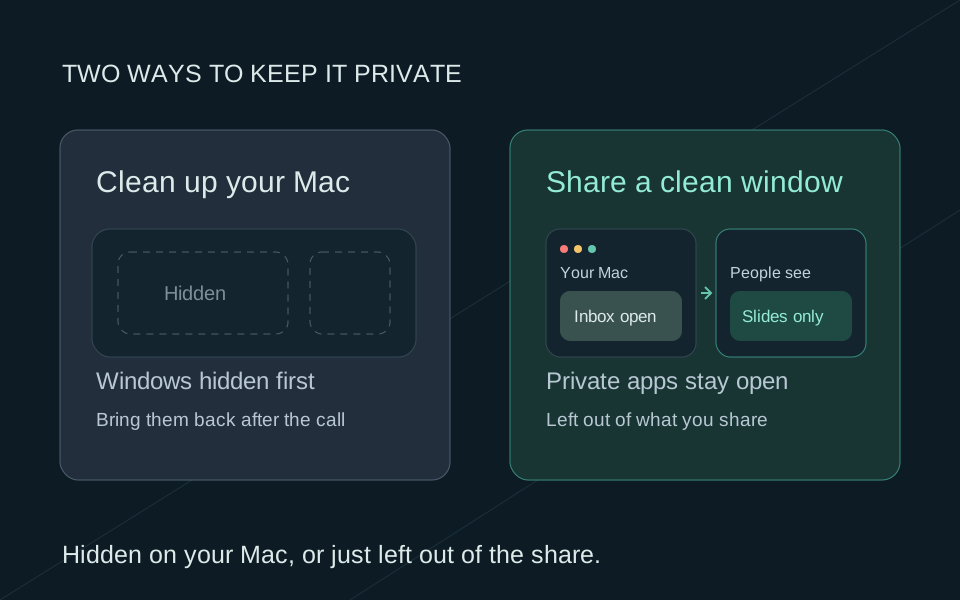
Stealthly tidies the Mac you're presenting from. When sharing starts, it turns on Do Not Disturb and hides desktop clutter and open windows. ScreenVeil works the other way around: your private apps stay open and usable, and you share a separate Privacy Screen window that leaves them out. Pick Stealthly for a spotless desktop in one step. Pick ScreenVeil if you need Slack, email or notes during the call.
Two different approaches
Where each app does its work
- 01
Stealthly cleans up your Mac
When sharing starts, it hides notifications, desktop icons, the Dock, your wallpaper and open windows, according to its website.
- 02
ScreenVeil builds a clean window
Private apps stay open on your Mac. You share Privacy Screen, a separate window that leaves them out.
Stealthly vs ScreenVeil at a glance
We make ScreenVeil, so we're not neutral. We checked Stealthly's website on September 26, 2026. Apps change, so check both sites before you buy.
Scroll sideways to compare →
| Stealthly | ScreenVeil | |
|---|---|---|
| How it works | Hides things on your Mac when sharing or recording starts | Shows your screen without your private apps in a separate window |
| Private apps during the call | Hidden. It doesn't reopen them, but you can bring them back yourself | Open and usable on your Mac the whole time |
| Notifications | Turns on Do Not Disturb | Leaves macOS notification banners out of Privacy Screen by default |
| Desktop icons, Dock and wallpaper | Hidden | Shown as they are, minus your private apps |
| What you share | Whatever you normally share | The Privacy Screen window |
| Price | $12.99 once, with a 14-day trial on its website | $9.99 once, with 3 free sessions |
| Requires | macOS 14 or later | macOS 14 or later |
When Stealthly is the better pick
You present from one app, want a spotless desktop and don't need Slack or email until you're done. Stealthly gets your Mac ready in one step, and you share your screen the way you always do. Its website says automatic detection of sharing is only in the version sold on its site, not the Mac App Store one.
When ScreenVeil is the better pick
You demo across several apps and still need Slack, email or your notes during the call. With ScreenVeil, those apps stay open on your Mac and never appear in the window people see.
Try ScreenVeil in three steps
- 1
Start Privacy Screen
Install ScreenVeil on macOS 14 or later, allow Screen Recording, and start Privacy Screen from the menu bar.
- 2
Mark private apps
Pick the apps your audience shouldn't see, like Slack, Mail or Messages.
- 3
Share the window
In Zoom, Meet or Teams, choose the Privacy Screen window instead of your whole screen. Test it once from a second device.
Before you switch
0 of 4 checked
For your rehearsal. Selections stay on this page and are not sent anywhere.
Related guides
Comparison
CleanSlate vs ScreenVeil: clean desktop or clean window?
CleanSlate and ScreenVeil both cost $9.99 once. CleanSlate tidies your Mac right before you share. ScreenVeil keeps private apps open and out of the window you share.
Comparison
Muzzle alternatives for Mac in 2026
Muzzle's latest release is from 2021. Six current ways to keep notifications and private apps out of a screen share on your Mac, from a free macOS setting to ScreenVeil.
Comparison
Privacy screen sharing app for Mac: five options compared
Compare five screen-sharing privacy options for Mac (Focus, Muzzle, Stealthly, PliimPRO and ScreenVeil) and find the simplest one that covers what you need to hide.